My first fleet control plane wasn't mine. It was Oracle's.
If you patched Oracle E-Business Suite, you remember adpatch. It asked how
many parallel workers you wanted, handed jobs out to them, and let you watch
and steer them from adctrl. When a worker failed, you fixed the problem and
ran adpatch again. It asked whether to continue your previous session and
picked up exactly where it left off. adadmin used the same worker engine
for every other maintenance chore.
That shape stuck with me: one operator, one CLI, an explicit number of workers, and the ability to stop and resume at any point. I've rebuilt it for every fleet I've run since.
At InVision, where we ran 300+ environments with ~10,000 logical databases on 700 physical database clusters, it was the data migrator we used in 2017 to move customers into their own private clouds. Each run got a job ID and ran as named phases (drop, then seed), each one a Kubernetes job. The operator saw one live status table for every step, the logs of every pod were saved under the job ID, and an error sweep at the end pointed straight at the failing schema:
*** Starting Private Cloud Migration on Wed Dec 27 10:16:55 PST 2017 ***

Job ID:         2017-12-27-101604
From Cluster:   use1-prod-1
To Cluster:     use1-prod-3-acme-cluster

Pod                            Time             Group      Phase                      Status
------------------------------ ---------------- ---------- -------------------------- -------
migrator-job-{m}-tzw87@acme    Dec 27 10:17:51  migration  acme_invisionapp           started
migrator-job-{m}-tzw87@acme    Dec 27 10:19:26  migration  acme_invisionapp           ended
migrator-job-{m}-tzw87@acme    Dec 27 10:19:28  migration  acme_boards-api-v7         started
migrator-job-{m}-tzw87@acme    Dec 27 10:19:37  migration  acme_boards-api-v7         ended
migrator-job-{m}-tzw87@acme    Dec 27 10:20:12  migration  freehandapi                failed
...
Migration experienced errors - please review container logs!
DETECTED Migration ERRORS:
.../migrator-job-2017-12-27-101604-seed.log: Schema migrations for 'freehandapi' failed
Different decade, different stack, same shape: a job you can name, phases you can rerun, a table you can grep, and errors that tell you where to look.
At Auth0 it became fleet, the database provisioner and maintainer for
every environment (later known internally as skipper, and the basis of
US patent 11,693,748,
"provisioning and decoupled maintenance of cloud-based database systems").
Same shape again: a whole environment's database stack described in one
small file, applied by a CLI with explicit workers and a dry run, in about
45 minutes:
fleet cli env imp --environmentName=env1 --inFile=env1_import.csv --dryRun=false
fleet execute --limitToEnvironment=env1 --workers=12 --dryRun=false
Every step was idempotent, so a rerun was also the verification pass:
[ users:users_db@env1 ] reconciling users:users_db in "env1" ...
[ users:users_db@env1 ] running ( dryRun = false ) "backupVault"
[ users:users_db@env1 ] ... already done
[ users:users_db@env1 ] running ( dryRun = false ) "backupPlan"
[ users:users_db@env1 ] ... already done
[ users:users_db@env1 ] > stage completed in: 497.934ms
[ legacy:other_db@env1 ] ... reconcile failed with: deployment is created outside of fleet and is not supported by the provisioner
And most recently it ran on a Vitess fleet of roughly 11,000 MySQL nodes. There, it took a full fleet roll onto a new version from more than two days of babysitting to about 35 minutes.
None of that speed came from being clever. It came from being boring in a very specific way, the adpatch way, plus brakes that work every time.
Today I'm open-sourcing the pattern as hammerdown, a small, dependency-free Go CLI you can fork into your own control plane. It ships with a simulated 11,000-node fleet, so you can try everything below on a laptop in under a minute.
Put the hammer down. Keep the brakes. github.com/hashjoin/hammerdown
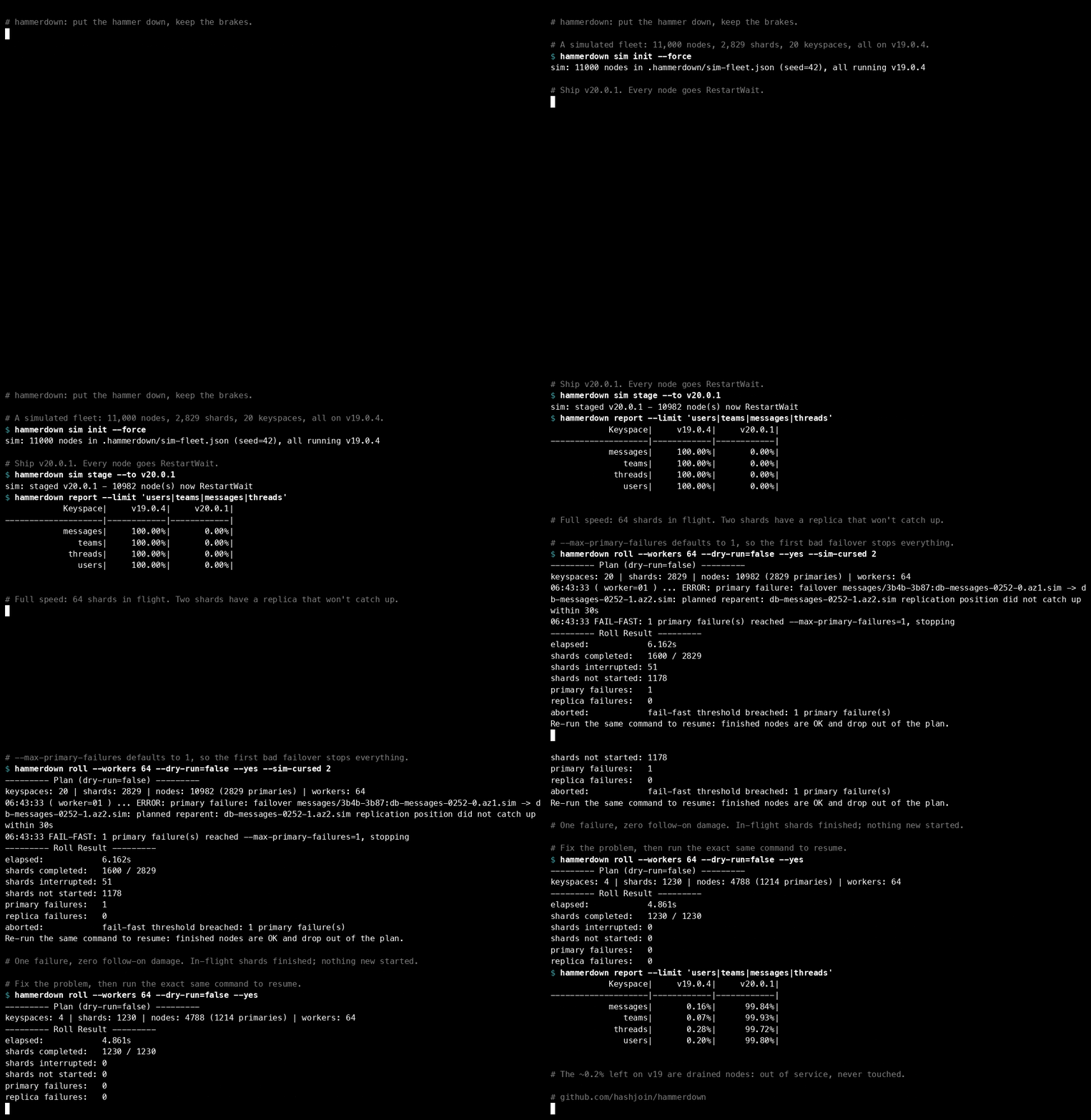
It's a clean, generic rewrite of the pattern, not any employer's code.
| adpatch / adadmin | hammerdown |
|---|---|
| "Number of parallel workers" prompt | --workers 64 |
adctrl worker status |
report, and worker=NN on every log line |
adctrl: tell workers to quit |
Ctrl-C drains: in-flight work finishes, nothing new starts |
| "Continue with your previous session?" | run the same command again to resume |
apply=n test mode |
--dry-run, on by default |
The shape of the problem
A database upgrade on a sharded fleet looks simple on a whiteboard:
- Put the new build on every node.
- Restart every node onto it.
- Don't drop writes.
Step 2 is where the two days go. Every shard has a primary and several replicas. You can restart replicas freely, but you have to move the primary somewhere else before restarting it, and that somewhere must already be running the new build. Otherwise you'll promote an old binary, or worse, a replica with a different MySQL version, and break replication for the whole shard.
Multiply that by a few thousand shards. Now add the reality of a production fleet: drained hosts, in-flight node replacements, backups, peak-traffic windows, and an on-call handoff at 11 a.m. You want to go fast, and you want to be able to stop instantly.
Why a CLI and not a pipeline
Every few years someone suggests replacing the CLI with a workflow engine. Every time, I've ended up back at a single binary run by an operator from a box with access to the fleet. Three reasons:
- The operator is the safety system. During a fleet upgrade you change your mind constantly: skip that keyspace, go faster on that one, stop before the backup window. A CLI turns those decisions into flags. A pipeline turns them into PRs.
- Dry run is free. The same binary prints exactly what it would do.
- Databases are pets, not cattle. Infrastructure-as-code tools are built around create, update and delete of interchangeable resources. Database fleets live for a decade, carry history nobody wants to recreate, and need operations those tools never imagined: clone a production cluster's metadata and rehearse maintenance on the copy, consolidate low-tier environments to cut cost. A CLI you own bends to that; a third-party DSL doesn't.
- Goroutines are the right size. "N shards in flight, one goroutine per shard, one shared fail-fast counter" fits in a few hundred lines. There's no state machine service to operate.
A tour in six commands
go install github.com/hashjoin/hammerdown/cmd/hammerdown@latest

hammerdown sim init                      # 11,000 simulated nodes on v19.0.4
hammerdown sim stage --to v20.0.1        # "deploy" a build: nodes go RestartWait
hammerdown report
The report is fixed-width ASCII on purpose. It has to survive ssh, tmux,
grep and awk, because that's where you'll read it at 3 a.m.:
              Keyspace:Build| Deployed|  Running|   Target|   Done %|
---------------------------|---------|---------|---------|---------|
           messages:v20.0.1|     4345|        0|     4345|     0.00|
              teams:v20.0.1|     1439|     1439|     1439|   100.00|
              users:v20.0.1|     1022|     1022|     1022|   100.00|
hammerdown report | egrep 'Keyspace:Build|v20' | grep -v 100.00 # what's left?
Canary first: one shard of every keyspace.
hammerdown roll --shards-per-keyspace 1                          # dry run (the default)
hammerdown roll --shards-per-keyspace 1 --dry-run=false --yes
Then the fleet:
hammerdown roll --workers 64 --dry-run=false --yes
--------- Plan (dry-run=false) ---------
keyspaces: 20 | shards: 2829 | nodes: 10982 (2829 primaries) | workers: 64
...
( dry-run=false ) ( worker=32 ) ... processing users/1f00-2000 (4 node(s))
( dry-run=false ) ( worker=32 ) ... restarting replica users/1f00-2000:db-users-0031-2.az1.sim (v19.0.4 -> v20.0.1)
...
--------- Roll Result ---------
elapsed:            11.129s
shards completed:   2829 / 2829
primary failures:   0
replica failures:   0
(The sim fakes ~50ms per restart. On real hardware each restart takes minutes, which is exactly why the concurrency model matters.)
Lesson 1: explicit workers beat ratios
Our first scheduler sized concurrency as a ratio, "2% of the shards in each keyspace", which sounded adaptive. In practice nobody could answer the only question that matters before pressing enter: how many primaries could be mid-failover right now?
hammerdown takes a number:
--workers 64           # at most 64 shards in flight, fleet-wide
--keyspace-workers 8    # and at most 8 in any one keyspace
Workers are slots, and the logs tell you which slot did what (worker=32).
You can reason about the blast radius in your head.
Lesson 2: one shard, one worker, one lock, in this order
Inside a shard, the bundled LeaderAware processor always does the same
thing:
- Restart the replicas, so the new build lands there first.
- If any replica failed, leave the primary alone.
- Pick a failover candidate that is already running the primary's target build.
- Do a planned failover, and wait until the old primary is demoted.
- Restart the old primary, now a replica.
The whole shard runs under a shard lock. The whole batch runs under a process lock that is re-validated on a ticker. If someone else takes it, the roll drains. Use the same locks your other automation respects (resharding, node replacement), not private ones.
Lesson 3: fail fast, exactly
"Stop after the first bad failover" is easy to say and surprisingly easy to get wrong with 64 goroutines. If counting and stopping happen in different places, two more failovers start in the gap.
In hammerdown, the failure that crosses the threshold drains the batch
before Fail() returns:
func (b *Batch) countFailure(shard string, n *fleet.Node, err error) {
    b.mu.Lock()
    defer b.mu.Unlock()
    // ...record it...
    if errors.Is(err, ErrPrimary) {
        b.primaryFails++
        if b.MaxPrimaryFailures > 0 && b.primaryFails == b.MaxPrimaryFailures {
            b.drainLocked(fmt.Errorf("%w: %d primary failure(s)", ErrFailFast, b.primaryFails))
        }
        return
    }
    // ...same for replicas...
}
And every processor checks job.Stopped() before every node operation. Try
it: curse two shards so their failover always fails.
hammerdown roll --workers 64 --sim-cursed 2 --dry-run=false --yes
... ERROR: primary failure: failover messages/3b4b-3b87:db-messages-0252-0.az1.sim -> ...
FAIL-FAST: 1 primary failure(s) reached --max-primary-failures=1, stopping

--------- Roll Result ---------
shards completed:   1590 / 2829
shards interrupted: 51
shards not started: 1188
primary failures:   1
aborted:            fail-fast threshold breached: 1 primary failure(s)

Re-run the same command to resume: finished nodes are OK and drop out of the plan.
Exactly one bad failover. Zero follow-on damage.
Lesson 4: stopping is a feature
Most of the incidents I've seen during upgrades didn't happen during the restart. They happened because the restart was still going when something else started: peak traffic, the backup window, a tired on-call. hammerdown gives you three ways to stop, and all of them are graceful:
--stop-at 90m                                         # no new shards after this
--blackout 06:00-11:00 --blackout-tz America/Los_Angeles   # no new shards inside this window
Ctrl-C works the same way. Once drains: in-flight node operations finish, shard locks are released, nothing new starts. Twice aborts in-flight operations. Three times exits immediately. Since nodes that finished report OK, resuming is just running the same command again.
Lesson 5: filters are the UI
During a real upgrade you spend most of your time aiming:
--limit 'users/ALL|teams/-80,80-'   # these keyspace/shards
--limit 'mess*/4*'                  # globs on both
--skip  'billing/ALL'               # never these (skip always wins)
--replica-only --cell az1           # replicas in one AZ
--target v20.0.1                    # only nodes staged for this build
--shards-per-keyspace 1              # canary
Add --debug and hammerdown tells you why each node wasn't picked.
Make it yours: two verbs and one line
The engine never talks to your infrastructure. A backend does, and backends are wired in one place:
// cmd/hammerdown/backends.go
func backends() []backend.Factory {
    return []backend.Factory{
        sim.NewFactory(),
        shell.NewFactory(),
        vitess.NewFactory(), // <- yours
    }
}
For any primary/replica system (Vitess, MySQL, Postgres with Patroni, Redis, MongoDB) you implement two blocking verbs and get everything else for free:
type NodeOps interface {
    Restart(ctx context.Context, n *fleet.Node) error                       // until healthy
    Failover(ctx context.Context, s *roll.Shard, from, to *fleet.Node) error // until demoted
}
Not ready to write Go? The shell backend drives the scripts you already
have:
hammerdown roll --backend shell \
  --shell-inventory ./inventory.sh \
  --shell-restart  'ssh {{.Node.Host}} sudo systemctl restart mysqld' \
  --shell-failover 'vtctldclient PlannedReparentShard {{.Shard.Keyspace}}/{{.Shard.Name}} --new-primary {{.To.Name}}' \
  --workers 4
Claude-ready, on purpose
I use Claude every day for operations work. The rule I follow is "Claude handles the judgment, code handles anything that has to come out the same way twice". A rolling restart is squarely the second kind, but writing a new backend is a great job for Claude.
So the repo ships with a CLAUDE.md that maps the code, lists the
invariants that must never break (dry run touches nothing, check Stopped()
before every operation, never promote a node that isn't on the target
build), and gives the exact recipe for adding a backend, plus a project
skill that interviews you for the details. Open it in Claude Code and say:
Add a
patronibackend. Inventory frompatronictl list -f json, restart via ssh + systemctl, healthy whenpg_isready, failover withpatronictl switchover. Tests with a fake patronictl.
It knows where the seams are and what not to touch.
What's next
hammerdown is the first tool in a small family named after the 70s CB radio it borrows from:
- rubberduck, the lead truck: canary rollouts that gate the convoy
- smokey, the watchdog: SLO-aware stop conditions
- breaker, the kill switch: one drain signal for every running roll
- tenfour, acknowledgements: two-person approval for risky runs
I'd love help: backends for the systems you run, guards you wish you'd had at 3 a.m., and war stories as issues. The repo is github.com/hashjoin/hammerdown, Apache-2.0.
Running a big fleet upgrade, or tired of babysitting one?
This is what HASHJOIN does: operations automation you can trust at 3 a.m., scoped to your stack.